Authentication
In order to access this API, the user agent needs to send your API key in the Authorization header using Bearer schema.
Go to your API Keys dashboard to create and manage your keys.
Manage API Keys →Try it for free. The first 50 API calls are on us — no credit card required. Contact us to get access to the free credits.
Contact us →Authorization: Bearer <your api token>
const headers = new Headers();
headers.append("Authorization", "Bearer YOUR_API_KEY_HERE");

const formdata = new FormData();

const requestOptions = {
  method: ...,
  body: ...,
  headers: headers,
};

fetch(url, requestOptions)
Image Upscaler
The image upscale feature provides a better image to the user by increasing its resolution.
Method: POST
Endpoint: https://api.vecticon.co/api/v2.0/ai-tools/image-upscaler
Authorization: Bearer <your api token>
Request Bodymultipart/form-data
file - File
Required
The reference image to upscale.
Supported file formats: PNG, JPG, WEBP, PDF.
face_enhance - boolean
Whether or not to enhance the face(s) of the image.
Default value: true
upscale_size - integer
The image upscaling size.
Range: 2-10
Default value: 2
ai_model - string
Used to determine which AI model to use when upscaling an image.
Default value: standard
Enum values
standard
Best choice for upscaling various types of images, including those with people, objects, and a wide range of other subjects.
pro
Ideal for detailed photography. Preserves more details compared to the standard model, though it requires additional processing time.
creative
Perfect for adding artistic details to your image. This model introduces creative elements, diverging from the original image.
const url = "https://api.vecticon.co/api/v2.0/ai-tools/image-upscaler"

const headers = new Headers();
headers.append("Authorization", "Bearer YOUR_API_KEY_HERE");

const formdata = new FormData();

formdata.append("file", "image.png");
formdata.append("face_enhance", true);
formdata.append("upscale_size", 2);

const requestOptions = {
  method: 'POST',
  body: formdata,
  headers: headers,
};

fetch(url, requestOptions)
  .then(response => response.json())
  .then(result => console.log(result))
  .catch(error => console.log("error", error));
{
    "image_url": "...",
    "operation_id": "..."
}
Image Vectorizer
The image vectorizer endpoint is used to convert a reaster image into a vector file.
Method: POST
Endpoint: https://api.vecticon.co/api/v2.0/ai-tools/image-vectorizer
Authorization: Bearer <your api token>
Request Bodymultipart/form-data
file - File
The reference image to vectorize. Required if file_url is not provided.
Supported file formats: PNG, JPG, WEBP, AVIF, PDF, SVG.
file_url - string
URL to the file to vectorize. Must be publicly accessible. Can be used interchangeably with the 'file' field; if both are provided, 'file' takes precedence.
format - string
The file format in which to vectorize the image.
Default value: svg
Enum values
svg
Use to receive a vector file in SVG format.
eps
Use to receive a vector file in EPS format
const url = "https://api.vecticon.co/api/v2.0/ai-tools/image-vectorizer"

const headers = new Headers();
headers.append("Authorization", "Bearer YOUR_API_KEY_HERE");

const formdata = new FormData();

formdata.append("file", "image.png");
formdata.append("format", 'svg');

const requestOptions = {
  method: 'POST',
  body: formdata,
  headers: headers,
};

fetch(url, requestOptions)
  .then(response => response.json())
  .then(result => console.log(result))
  .catch(error => console.log("error", error));
{
    "image_url": "...",
    "operation_id": "..."
}
Background Remover
The image background removal tool is used to automatically remove the background from an image.
Method: POST
Endpoint: https://api.vecticon.co/api/v2.0/ai-tools/background-remover
Authorization: Bearer <your api token>
Request Bodymultipart/form-data
file - File
Required
The reference image to remove the background from.
Supported file formats: PNG, JPG, WEBP, PDF
const url = "https://api.vecticon.co/api/v2.0/ai-tools/background-remover"

const headers = new Headers();
headers.append("Authorization", "Bearer YOUR_API_KEY_HERE");

const formdata = new FormData();

formdata.append("file", "image.png");

const requestOptions = {
  method: 'POST',
  body: formdata,
  headers: headers,
};

fetch(url, requestOptions)
  .then(response => response.json())
  .then(result => console.log(result))
  .catch(error => console.log("error", error));
{
    "image_url": "...",
    "operation_id": "..."
}
Method: POST
Endpoint: https://api.vecticon.co/api/v2.0/ai-tools/image-generator
Authorization: Bearer <your api token>
Request Bodyapplication/json
prompt - string
Required
The prompt parameter is the text that directs the AI to create an image based on your description. It captures the concept or scene you want the AI to visualize. A well-crafted prompt, like "A peaceful forest at night with a glowing moon," helps ensure accurate results.
negative_prompt - string
The negative_prompt parameter allows you to guide the AI by indicating what you don't want in the image, refining the result to better match your vision.
number_of_results - string
Describes the number of images the API will generate and return.
Range: 1-4
Default value: 1
aspect_ratio - string
Describes the aspect ratio which will be applied on the generated image(s).
Default value: 1:1
Enum values
1:1
Perfectly square, providing a harmonious and proportional layout.
9:16
Ideal for vertical content, designed to captivate and enhance visual storytelling.
16:9
Widescreen format, ideal for capturing larger landscapes.
4:3
Elegant horizontal format, portrait orientation.
3:4
Portrait-oriented, gracefully accentuating vertical features.
3:2
A classic proportion that offers a broader perspective.
const url = "https://api.vecticon.co/api/v2.0/ai-tools/image-generator"

const headers = new Headers();
headers.append("Authorization", "Bearer YOUR_API_KEY_HERE");
headers.append("Content-Type", "application/json");


const requestOptions = {
  method: 'POST',
  body: JSON.stringify({
    "prompt": "A medieval castle siege taking place in France in 1356."
    "negative_prompt": "Mythological creatures"
    "number_of_results": 3
    "aspect_ratio": "16:9"
  }),
  headers: headers,
};

fetch(url, requestOptions)
  .then(response => response.json())
  .then(result => console.log(result))
  .catch(error => console.log("error", error));
{
    "image_url": "...",
    "operation_id": "..."
}
Image Colorizer
The image colorizer endpoint is used to colorize a black-and-white image.
Method: POST
Endpoint: https://api.vecticon.co/api/v2.0/ai-tools/image-colorizer
Authorization: Bearer <your api token>
Request Bodymultipart/form-data
file - File
Required
The original image to colorize.
Supported file formats: PNG, JPG, WEBP
const url = "https://api.vecticon.co/api/v2.0/ai-tools/image-colorizer"

const headers = new Headers();
headers.append("Authorization", "Bearer YOUR_API_KEY_HERE");

const formdata = new FormData();

formdata.append("file", "image.png");

const requestOptions = {
  method: 'POST',
  body: formdata,
  headers: headers,
};

fetch(url, requestOptions)
  .then(response => response.json())
  .then(result => console.log(result))
  .catch(error => console.log("error", error));
{
    "image_url": "...",
    "operation_id": "..."
}
Image Inpaint
The image inpaint endpoint is used to removed unwanted parts from an image.
Method: POST
Endpoint: https://api.vecticon.co/api/v2.0/ai-tools/image-inpaint
Authorization: Bearer <your api token>
Request Bodymultipart/form-data
image - File
Required
The original image to inpaint.
Supported file formats: PNG, JPG, WEBP
Demo:
mask - File
Required
An image containing the negative mask of the unwanted parts to delete.
Supported file formats: PNG, JPG, WEBP
Demo:

const url = "https://api.vecticon.co/api/v2.0/ai-tools/image-inpaint"

const headers = new Headers();
headers.append("Authorization", "Bearer YOUR_API_KEY_HERE");

const formdata = new FormData();

formdata.append("image", "image.png");
formdata.append("mask", "mask.png");

const requestOptions = {
  method: 'POST',
  body: formdata,
  headers: headers,
};

fetch(url, requestOptions)
  .then(response => response.json())
  .then(result => console.log(result))
  .catch(error => console.log("error", error));
{
    "image_url": "...",
    "operation_id": "..."
}
Object Detection
Analyse the content of an image and detect all objects present in it. For each detected object the API returns a confidence score, a label describing the object, and a segmentation mask encoded as a base64 PNG string.
Method: POST
Endpoint: https://api.vecticon.co/api/v2.0/ai-tools/object-detection
Authorization: Bearer <your api token>
Request Bodymultipart/form-data
image - File
Required
The image to analyse. The API will detect all objects present in it and return a label, a confidence score, and a segmentation mask for each one.
Supported file formats: PNG, JPG, WEBP, TIFF, AIFF
Demo:

const url = "https://api.vecticon.co/api/v2.0/ai-tools/object-detection"

const headers = new Headers();
headers.append("Authorization", "Bearer YOUR_API_KEY_HERE");

const formdata = new FormData();
formdata.append("image", imageFile); // File object or Blob

const requestOptions = {
  method: 'POST',
  body: formdata,
  headers: headers,
};

fetch(url, requestOptions)
  .then(response => response.json())
  .then(result => console.log(result))
  .catch(error => console.log("error", error));
"objects": [
  {
    "score": 0.998652,
    "label": "handbag",
    "mask": "<base64-encoded PNG mask>"
  },
  {
    "score": 0.927888,
    "label": "window-other",
    "mask": "<base64-encoded PNG mask>"
  },
  {
    "score": 0.999516,
    "label": "person",
    "mask": "<base64-encoded PNG mask>"
  },
  ...
],
"operation_id": "..."
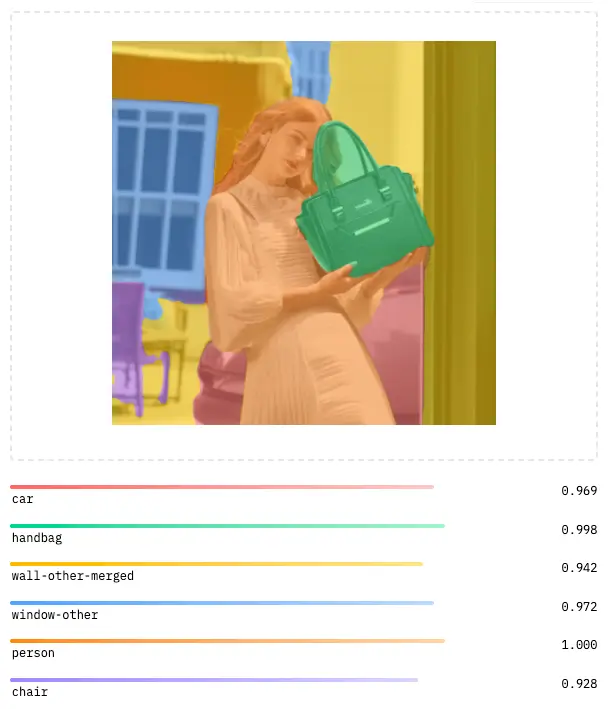
Image Outpaint
The image outpaint endpoint is used to extend an image beyond its original boundaries using AI-powered generation.
Method: POST
Endpoint: https://api.vecticon.co/api/v3/image-outpaint
Authorization: Bearer <your api token>
Request Bodymultipart/form-data
image - File
Required
The original image to extend. The output image dimensions are set by width and height, and the original image is placed within it at reference_offset_x and reference_offset_y.
Supported file formats: PNG, JPG, WEBP
width - integer
Required
The width, in pixels, of the resulting outpainted image.
height - integer
Required
The height, in pixels, of the resulting outpainted image.
reference_offset_x - integer
Required
The horizontal offset, in pixels, at which the original image is placed within the resulting canvas. Reference the top left corner of the original image as (0, 0).
reference_offset_y - integer
Required
The vertical offset, in pixels, at which the original image is placed within the resulting canvas. Reference the top left corner of the original image as (0, 0).
const url = "https://api.vecticon.co/api/v3/image-outpaint"

const headers = new Headers();
headers.append("Authorization", "Bearer YOUR_API_KEY_HERE");

const formdata = new FormData();

formdata.append("image", "image.png");
formdata.append("width", "1920");
formdata.append("height", "1080");
formdata.append("reference_offset_x", "0");
formdata.append("reference_offset_y", "0");

const requestOptions = {
  method: 'POST',
  body: formdata,
  headers: headers,
};

fetch(url, requestOptions)
  .then(response => response.json())
  .then(result => console.log(result))
  .catch(error => console.log("error", error));
{
    "image_url": "...",
    "operation_id": "..."
}
DPI Converter
The DPI converter tool allows you to change the DPI (dots per inch) resolution of an image. This is useful for preparing images for print or adjusting resolution metadata without changing the actual pixel dimensions.
Method: POST
Endpoint: https://api.vecticon.co/api/v2.0/tools/dpi-converter
Authorization: Bearer <your api token>
Request Bodymultipart/form-data
file - File
Required
The image file to convert to a new DPI resolution.
Supported file formats: PNG, JPG, WEBP.
new_dpi - integer
Required
The target DPI (dots per inch) value for the output image. Common values are 72 for web, 150 for draft print, and 300 for high-quality print.
const url = "https://api.vecticon.co/api/v2.0/tools/dpi-converter"

const headers = new Headers();
headers.append("Authorization", "Bearer YOUR_API_KEY_HERE");

const formdata = new FormData();

formdata.append("file", "image.png");
formdata.append("new_dpi", "300");

const requestOptions = {
  method: 'POST',
  body: formdata,
  headers: headers,
};

fetch(url, requestOptions)
  .then(response => response.json())
  .then(result => console.log(result))
  .catch(error => console.log("error", error));
{
    "image_url": "...",
    "operation_id": "..."
}
File Converter
The file converter tool allows you to convert images between different file formats. Convert your images to PNG, JPG, WEBP, AVIF, PDF, and more.
Method: POST
Endpoint: https://api.vecticon.co/api/v2.0/tools/file-converter
Authorization: Bearer <your api token>
Request Bodymultipart/form-data
file - File
Required
The image file to convert to a different format.
Supported file formats: PNG, JPG, WEBP, AVIF, PDF, SVG.
output_format - string
Required
The target file format for the converted image.
Enum values
png
Convert to PNG format. Best for images with transparency or sharp edges.
jpg
Convert to JPG format. Best for photographs and images without transparency.
webp
Convert to WebP format. Modern format with excellent compression and quality.
avif
Convert to AVIF format. Next-gen format with superior compression.
Convert to PDF format. Ideal for documents and print-ready files.
const url = "https://api.vecticon.co/api/v2.0/tools/file-converter"

const headers = new Headers();
headers.append("Authorization", "Bearer YOUR_API_KEY_HERE");

const formdata = new FormData();

formdata.append("file", "image.png");
formdata.append("output_format", "webp");

const requestOptions = {
  method: 'POST',
  body: formdata,
  headers: headers,
};

fetch(url, requestOptions)
  .then(response => response.blob())
  .then(blob => {
    // Handle the converted file blob
    console.log("Converted file:", blob);
  })
  .catch(error => console.log("error", error));
Binary file data (the converted image file)

Note: The response is returned as binary data (ArrayBuffer/Blob),
not JSON. Save the response directly as a file with the appropriate extension.
Color Profile Converter
The color profile converter tool allows you to convert images between different ICC color profiles (e.g., sRGB, Adobe RGB, CMYK profiles). This is essential for ensuring color accuracy across different devices and for preparing images for professional print workflows.
Method: POST
Endpoint: https://api.vecticon.co/api/v3/color-profile-editor
Authorization: Bearer <your api token>
Request Bodymultipart/form-data
image - File
Required
The image file to convert to a new color profile.
Supported file formats: PNG, JPG, WEBP, TIFF.
target_profile - string
Required
The ICC color profile to convert the image to. Supports both RGB and CMYK profiles.
Enum values
sRGB
Standard RGB color space, widely used for web and digital displays.
AdobeRGB1998
Adobe RGB (1998) color space, offering a wider gamut than sRGB. Ideal for professional photography.
ProPhotoRGB
ProPhoto RGB color space with an extremely wide gamut, suitable for high-end photo editing.
DisplayP3
Display P3 color space, used by modern Apple devices and HDR displays.
AppleRGB
Apple RGB color space, a legacy profile used by older Apple displays.
ColorMatchRGB
ColorMatch RGB, designed for prepress workflows with Radius PressView displays.
USWebCoatedSWOP
U.S. Web Coated (SWOP) v2 — standard CMYK profile for US web offset printing.
USWebUncoated
U.S. Web Uncoated — CMYK profile for US uncoated paper printing.
CoatedFOGRA39
ISO Coated v2 (FOGRA39) — European standard CMYK profile for coated paper.
CoatedFOGRA27
Coated FOGRA27 — CMYK profile for coated paper (older ISO standard).
FOGRA51
FOGRA51 (PSO Coated v3) — modern European CMYK profile for coated paper.
JapanColor2001Coated
Japan Color 2001 Coated — standard CMYK profile for Japanese coated paper printing.
output_format - string
The MIME type of the output image. Determines the file format of the converted result.
Default value: image/tiff
Enum values
image/tiff
TIFF format — lossless, ideal for print workflows and preserving color profile accuracy.
image/png
PNG format — lossless compression, widely supported for digital use.
image/jpeg
JPEG format — lossy compression, best for photographs and smaller file sizes.
const url = "https://api.vecticon.co/api/v3/color-profile-editor"

const headers = new Headers();
headers.append("Authorization", "Bearer YOUR_API_KEY_HERE");

const formdata = new FormData();

formdata.append("image", "image.png");
formdata.append("target_profile", "USWebCoatedSWOP");
formdata.append("output_format", "image/tiff");

const requestOptions = {
  method: 'POST',
  body: formdata,
  headers: headers,
};

fetch(url, requestOptions)
  .then(response => response.json())
  .then(result => console.log(result))
  .catch(error => console.log("error", error));
{
    "ok": true,
    "source_profile": "sRGB",
    "target_profile": "USWebCoatedSWOP",
    "converted_image_base64": "base64_encoded_image_data...",
    "mime_type": "image/tiff",
    "operation_id": "..."
}
NSFW Check
The NSFW check endpoint is used to check if an image is Not Safe For Work (NSFW).
Method: POST
Endpoint: https://api.vecticon.co/api/v2.0/ai-tools/nsfw-check
Authorization: Bearer <your api token>
Request Bodymultipart/form-data
file - File
Required
The image to check for NSFW content.
Supported file formats: PNG, JPG, WEBP
const url = "https://api.vecticon.co/api/v2.0/ai-tools/nsfw-check"

const headers = new Headers();
headers.append("Authorization", "Bearer YOUR_API_KEY_HERE");

const formdata = new FormData();

formdata.append("file", "image.png");

const requestOptions = {
  method: 'POST',
  body: formdata,
  headers: headers,
};

fetch(url, requestOptions)
  .then(response => response.json())
  .then(result => console.log(result))
  .catch(error => console.log("error", error));
{
  "is_nsfw": true,
  "confidence": 0.9,
  "safe_score": 0.1
}
Image Relight
The image relight endpoint analyzes the content of an image and returns an intelligently relighted version with enhanced lighting and shadows.
Method: POST
Endpoint: https://api.vecticon.co/api/v3/relight
Authorization: Bearer <your api token>
Request Bodymultipart/form-data
file - File
Required
The image to relight with intelligent lighting analysis.
Supported file formats: PNG, JPG, WEBP
const url = "https://api.vecticon.co/api/v3/relight"

const headers = new Headers();
headers.append("Authorization", "Bearer YOUR_API_KEY_HERE");

const formdata = new FormData();

formdata.append("file", "image.png");

const requestOptions = {
  method: 'POST',
  body: formdata,
  headers: headers,
};

fetch(url, requestOptions)
  .then(response => response.json())
  .then(result => console.log(result))
  .catch(error => console.log("error", error));
{
    "image_url": "...",
    "operation_id": "..."
}
Clothes Extractor
The clothes extractor endpoint uses AI-powered segmentation to detect and isolate clothing items from any photo, returning a PNG with a transparent background.
Method: POST
Endpoint: https://api.vecticon.co/api/v3/extract-clothes
Authorization: Bearer <your api token>
Request Bodymultipart/form-data
file - File
Required
The input image from which clothing items will be extracted. The response will be a PNG with a transparent background containing only the detected garments.
Supported file formats: PNG, JPG, WEBP
Demo:

const url = "https://api.vecticon.co/api/v3/extract-clothes"

const headers = new Headers();
headers.append("Authorization", "Bearer YOUR_API_KEY_HERE");

const formdata = new FormData();

formdata.append("file", "image.png");

const requestOptions = {
  method: 'POST',
  body: formdata,
  headers: headers,
};

fetch(url, requestOptions)
  .then(response => response.json())
  .then(result => console.log(result))
  .catch(error => console.log("error", error));
{
    "image_url": "...",
    "operation_id": "..."
}

Delete Operation
Deletes a previously created operation by its ID. Once deleted, the operation and its associated data are permanently removed and cannot be recovered.
Method: DELETE
Endpoint: https://api.vecticon.co/api/v3/operations/{operationID}
Authorization: Bearer <your api token>
const operationId = "YOUR_OPERATION_ID_HERE";
const url = `https://api.vecticon.co/api/v3/operations/${operationId}`;

const headers = new Headers();
headers.append("Authorization", "Bearer YOUR_API_KEY_HERE");

const requestOptions = {
  method: 'DELETE',
  headers: headers,
};

fetch(url, requestOptions)
  .then(response => response.json())
  .then(result => console.log(result))
  .catch(error => console.log("error", error));
{
    "message": "Operation deleted successfully.",
}
Get Operation
Retrieves the details and current status of a previously created operation by its ID. Use this endpoint to poll for results after submitting an asynchronous operation.
Method: GET
Endpoint: https://api.vecticon.co/api/v3/operations/{operationID}
Authorization: Bearer <your api token>
const operationId = "req_iOnvk8bc8Kpoq65pg5BCLMh2XyPkWiGw4ja";
const url = `https://api.vecticon.co/api/v3/operations/${operationId}`;

const headers = new Headers();
headers.append("Authorization", "Bearer YOUR_API_KEY_HERE");

const requestOptions = {
  method: 'GET',
  headers: headers,
};

fetch(url, requestOptions)
  .then(response => response.json())
  .then(result => console.log(result))
  .catch(error => console.log("error", error));
{
    "id": "...",
    "data": {
        "input_file_url": "...",
        "input_file_name": "...",
        "input_file_format": "...",
        "output_file_url": "...",
        "created_at": "...",
        "tool_name": "..."
    }
}